Easy Redirects works on your storefront through an app embed in your theme. Turning it on takes about a minute, and it's the first step in the Dashboard setup guide.
⚠️ This step matters. If the app embed is off, Easy Redirects can't track 404s, and patterns, live redirects, Easy 404 Fix and AI Redirects won't work. 404 redirects you've already created keep working, because they're saved in Shopify.
Steps
- In Shopify, go to Online Store → Themes.
- On your current (published) theme, click Customize.

- In the left sidebar of the theme editor, click the App embeds icon.
- Find Easy Redirects and turn it on.
- Click Save in the top right.
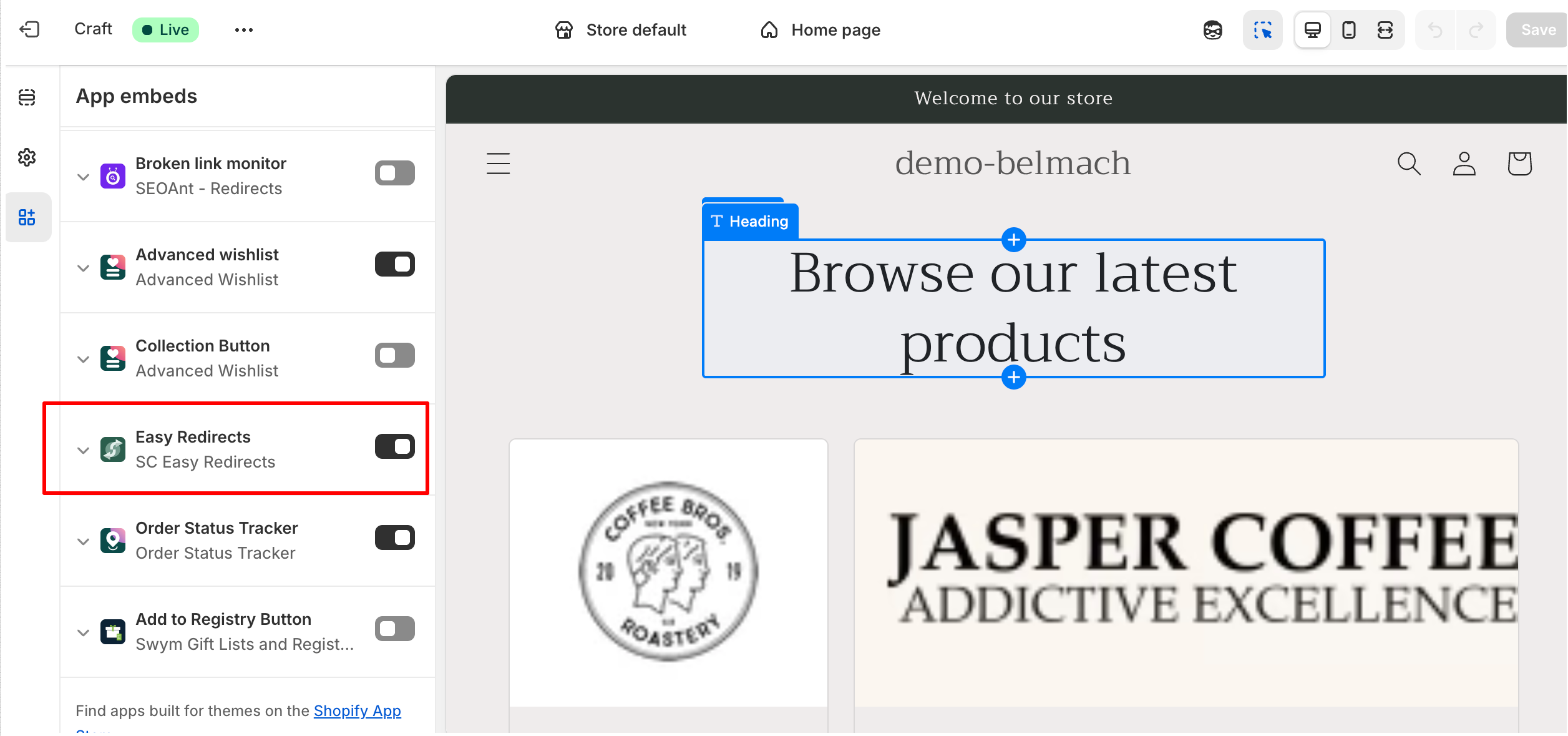
Check that it works
Open Easy Redirects. In the Dashboard setup guide, Enable app embed should be ticked.
Good to know
- Changed or updated your theme? App embeds are set per theme. When you publish a different theme, turn on the Easy Redirects app embed again in the new theme.
- Using an older (vintage) theme without app embeds? Follow Manual Installation instead.
- Seeing a "Missing 404 Template" message? Turning on the app embed fixes it. See this article for details.
Still stuck? Contact our support team and we'll turn it on for you. You can also book a call with our Product Manager.
Was this article helpful?
That’s Great!
Thank you for your feedback
Sorry! We couldn't be helpful
Thank you for your feedback
Feedback sent
We appreciate your effort and will try to fix the article