What CartHook's analytics show, how each number is worked out, and how to export them.
Open Analytics in CartHook to see what your funnels earn, by surface, funnel and offer.
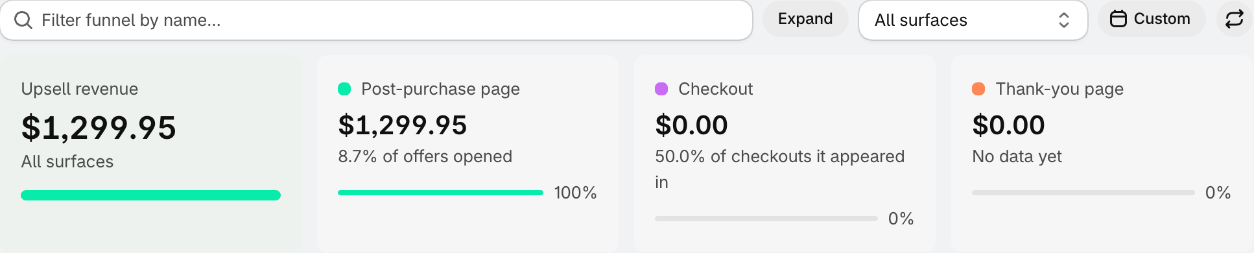
Choosing what to see
- Filter funnel by name - pick one or more funnels. With exactly one funnel, you also get its Funnel summary.
- Surface - All surfaces, Post-purchase page, Checkout (Shopify Plus) or Thank-you page.
- Date range - today (the default), yesterday, the last 7, 30 or 90 days, last month, last year, week, month, quarter or year to date, or your own dates. Dates are in your store's time zone.
- The refresh button reloads the figures.
The figures
| Figure | What it is |
|---|---|
| Upsell revenue | What your offers added, by surface - the offered products' price plus tax, and the offer's shipping on post-purchase offers. Refunds aren't subtracted. |
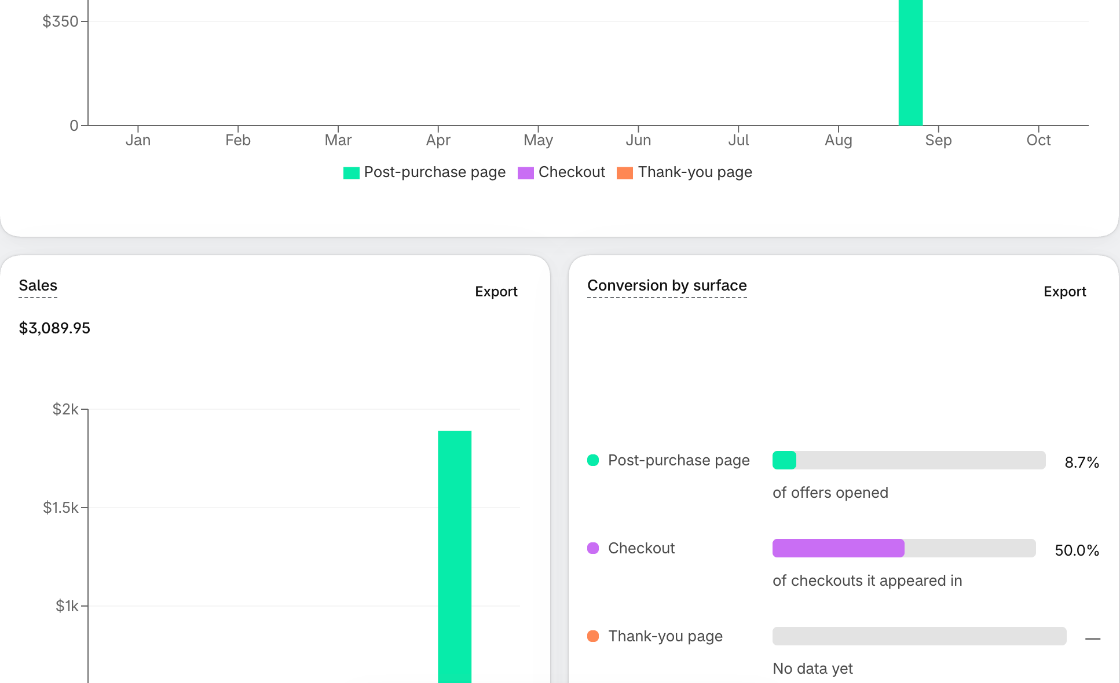
| Sales | The orders' total value: what customers bought themselves (Standard revenue) plus the upsells. |
| Conversion | Offers accepted, as a share of offers shown - see below. |
| Average order value | Sales divided by the number of orders, split into the standard order and the upsell additions. |
| Revenue per visitor | An offer's revenue divided by its views. |
| Views, Accept, Decline, Abandon | What customers did with an offer. Decline and Abandon exist only on the post-purchase page - in the checkout and on the thank-you page a customer simply doesn't add the offer. |
Conversion by surface
Each surface is measured against its own stage, so the rates aren't comparable with one another:
| Surface | Accepts divided by |
|---|---|
| Post-purchase page | Offers customers opened after their order. |
| Checkout | Checkouts an upsell appeared in - checkouts, not orders, and there are far more of them. |
| Thank-you page | Offers shown on the thank-you page. |
The Conversion funnel chart shows each stage - presented, opened, accepted - with the drop-off between them.
Tables
- Top converting funnels and Top revenue generating funnels - your best three funnels, with conversion and revenue.
- Top converting offers and Top revenue generating offers - your best three active offers, with conversion, revenue per visitor and their views, accepts, declines and abandons.
- Funnel summary (one funnel selected) - every offer in the funnel. With an A/B test, Set A's and Set B's totals sit above their offers.
Export
Select Export on any chart or table to email it as a CSV file - to your store's admin email, or another address. A new address is asked to confirm once, by email, within 24 hours, before it receives exports. You can send up to 5 exports a minute and 50 a day.
The export uses the dates, funnels and surface you have selected, and lists every row (the funnel tables include all funnels, not just three). The sales and revenue export lists each order line, with the order ID, customer email, payment gateway, currency, product, quantity, subtotal, tax, shipping and discount.
Note:
Exports are included in Growth and above.
Why the numbers can differ from Shopify's
- Refunds and cancellations aren't subtracted. Upsells CartHook removed because they were never paid for are left out.
- Revenue includes tax, and post-purchase offers' shipping.
- Amounts are shown in your store's currency, without conversion.
- Test orders are counted.
- Views are dated when they happen; revenue by when the order was placed.
- Figures can trail the last couple of minutes.
On each order in Shopify
Open an order in your Shopify admin to see the CartHook offers block: what the customer was shown, opened, accepted or declined (or Left without deciding), and what the offers earned on that order. It's the quickest way to answer "did this customer see my offer?" If the block isn't there, add it from the order page's Apps section.
Dashboard
CartHook's home page shows Performance for the last 7, 30 or 90 days across all surfaces - Revenue added, Funnel conversion and Views - and your Earning most funnels. See Your CartHook home page for everything else on it.
The Dashboard's figures are blended across surfaces; the Analytics page keeps each surface's conversion separate.
Per-offer numbers also appear on the offer cards in each funnel - see What the card tells you.
Was this article helpful?
That’s Great!
Thank you for your feedback
Sorry! We couldn't be helpful
Thank you for your feedback
Feedback sent
We appreciate your effort and will try to fix the article