Overview
Shopify themes that use AJAX for don't function correctly with Product Options
With AJAX, the cart updates dynamically without reloading the page, and when this happens, the changes that Product Options has made to the cart are erased. To correct this, it is necessary to trigger Options to redo its changes after the AJAX cart reload has completed.
Alert
This article only applies to Product Options as it requires technical knowledge and prior experience with JavaScript and AJAX. If you are not comfortable with this, please contact our Merchant Success team for assistance.
Setup
- From the Shopify admin, select Online Store, then Actions > Edit code.
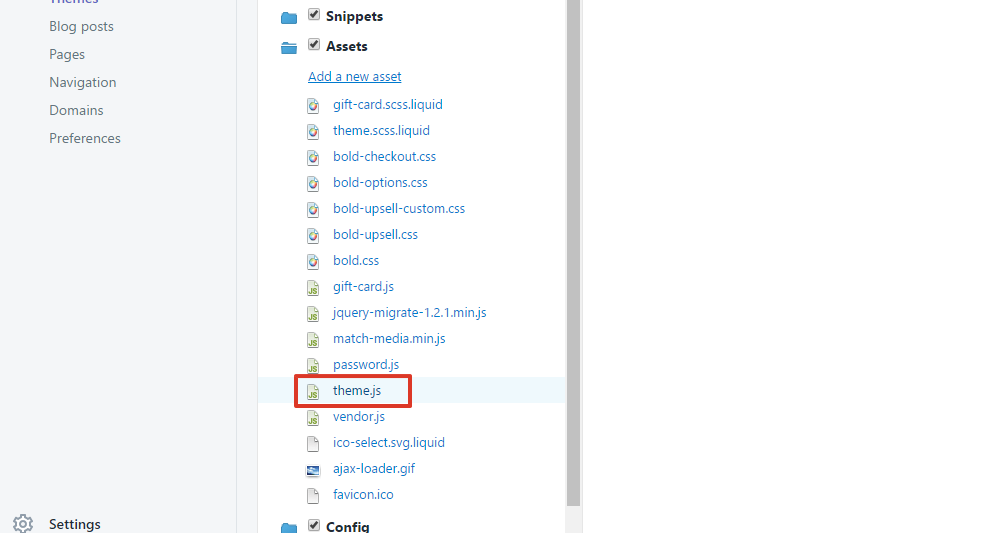
- Under Assets, select theme.js.
Note: If this file doesn’t exist, your main JavaScript file may be named: app.js, ajaxify.js, the same name as your theme, or something similar.
- Look for the function that draws the cart, like refreshCart or buildCart.

Add this code immediately after the opening of the function:
if(window.BOLD && BOLD.common && BOLD.common.cartDoctor && typeof BOLD.common.cartDoctor.fix === 'function'){
    cart = BOLD.common.cartDoctor.fix(cart);
}
It should look like this:

- Scroll down to the end of the function.

Add this code right at end of the function before the close:
if(window.BOLD && BOLD.common && BOLD.common.eventEmitter && typeof BOLD.common.eventEmitter.emit === 'function'){
  BOLD.common.eventEmitter.emit('BOLD_COMMON_cart_loaded', cart);
}
It should look like this:

- Select Save.
NOTE: This setup guide is only for V2, however, most of the time due to each Shopify theme unique codes, this may not be applicable to each theme, so please if this issue occurs, contact our Support team.
Was this article helpful?
That’s Great!
Thank you for your feedback
Sorry! We couldn't be helpful
Thank you for your feedback
Feedback sent
We appreciate your effort and will try to fix the article